Match the symptom to the stage
This guide's browser-specific limits apply to InstantMeshes.com. They do not describe the original Instant Meshes desktop program or every Blender importer. A source file opening in one application is useful evidence, but it does not prove that another parser supports the same variant.
| Symptom | First check | Useful next action |
|---|---|---|
| Choose file returns no model | Did a file actually reach the page? | Select a local copy or drag it into the upload area |
| Unsupported-format message | Extension and actual file encoding | Export OBJ, STL, ASCII PLY, or OFF |
| File reads but preview is empty | Usable faces, extreme coordinates, WebGL | Compare with a small known-good OBJ |
| Processing stops or times out | Input complexity and the visible error | Try a simpler copy and conservative settings |
| Result has holes or lost features | Compare source and output wireframes | Reject the result; increase target or change workflow |
When the mesh file will not open
The browser tool accepts OBJ, common ASCII or binary STL, ASCII PLY, and OFF, with a 25 MB input limit. Renaming a GLB to .obj does not convert it. Binary PLY needs a real export to a supported encoding. A file stored only in a cloud placeholder may also need to finish downloading before the browser can read it.
Open the file in its authoring application and confirm that it contains polygon faces, not only points, curves, or an empty selection. Export just the required mesh into a new file. If the source application also cannot read it, recover the source or export again; remeshing cannot reconstruct missing file bytes.
Separate reading from parsing
An empty-file or read error concerns the local file. A header, index, or unsupported-encoding error concerns its contents. Keep the exact visible error when comparing attempts.
Try the sample OBJ
Download the source sphere below and open it in the tool. If it appears while your file does not, focus on your file's format, encoding, and contents. If neither appears, check the visible errors and WebGL support.
Re-export a minimal copy
Export a single mesh object with a supported format and enough detail to reproduce the problem. Preserve the original and any textures separately. Avoid sending private models to unrelated online converters just to diagnose a local import.
When the mesh preview is not showing
A blank preview can come from geometry or rendering. An outlier vertex far from the rest of the model can make the useful surface appear tiny when the viewer centers the whole object. Missing faces, invalid coordinates, and an object containing only vertices need an export or geometry fix. A WebGL failure affects rendering even when the file itself is valid.
Try a small known-good mesh first, then inspect the problem model in Blender. Check its dimensions, disconnected objects, face orientation, and whether the intended object was selected for export. If several valid small files fail to display, inspect the browser's WebGL support and visible errors. Switching browsers is a diagnostic comparison, not an explanation of every failed upload.
When processing fails or produces holes
The current browser worker has a 30-second response timeout. Input byte size is not a reliable measure of processing cost: the number of vertices, faces, and connections matters too. Try a smaller representative export and a moderate target. Do not keep lowering the target as a universal performance fix, because a severe reduction can damage the surface.
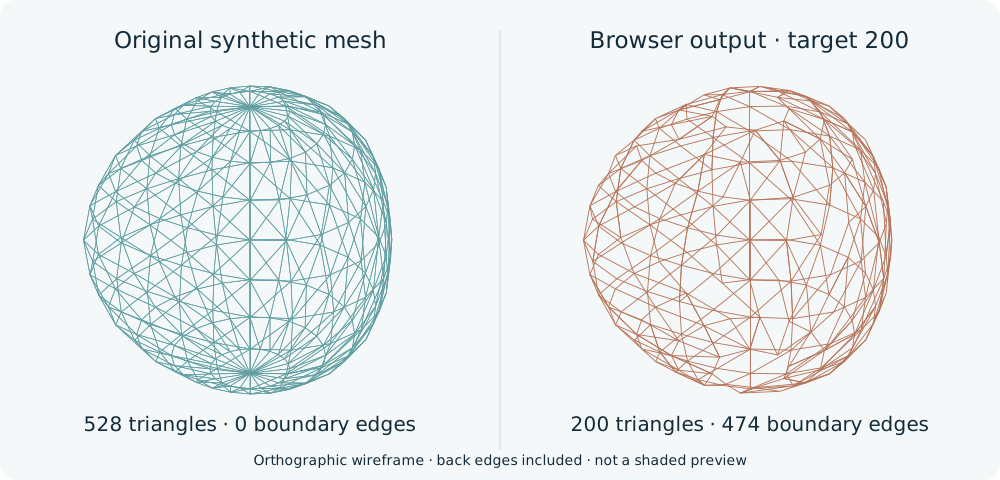
Compare solid and wireframe views before downloading. Preserve Boundaries protects identified input borders during part of the process; it does not guarantee that no new holes can appear. The current face-limiting step can remove faces. The synthetic example below documents this failure on a closed input, so increasing the target is an experiment rather than a guaranteed repair.
Keep a useful record of the failure
Write down the exact error, file format and size, target face count, and topology mode. Note whether the sample sphere opens and whether Blender can import your source. This gives a follow-up investigation a reproducible starting point.
You do not need to share a private model to describe the problem. State whether it is a scan with disconnected pieces, an open sheet, or a textured OBJ, and identify the first failed step. Keep a damaged output separate from the source so you can compare them later.
Reproducible example · 2026-10-22
Test case: a closed sphere develops open edges
We ran the current browser algorithm on an original procedural sphere with 528 triangles. The target was 200, with Triangle mode and both preservation options enabled. The output reached that count, but gained 474 boundary edges.
| Measurement | Input | Output |
|---|---|---|
| Triangles | 528 | 200 |
| Boundary edges | 0 | 474 |
A boundary edge belongs to only one face. The increase from zero to 474 reveals new openings; it counts edges, not individual holes. The OBJ could be exported and parsed again, but its surface was no longer closed. Keep the source instead of using this result as a printable solid.
To reproduce the test, open the source OBJ below, select Triangle mode, set the target to 200, and leave both preservation options on. Compare the result with the source in wireframe view.
Open the browser toolCommon questions
Why does binary PLY fail while STL works?
The current PLY parser accepts ASCII PLY, while the STL parser supports common binary and ASCII STL. Export ASCII PLY or OBJ from the source application instead of changing the extension.
Can Preserve Boundaries prevent every hole?
No. It protects detected source boundaries during clustering, but later processing can still remove faces. Compare the result against the original and reject a surface with unwanted gaps.
Why is the output OBJ larger than the input STL?
Text OBJ and binary STL encode data differently, and the current OBJ export can retain unused vertices. Fewer faces do not guarantee fewer bytes. Check geometry count and file size separately.
Is this a troubleshooting guide for the desktop Instant Meshes app?
The file-size, parser, and timeout details here describe InstantMeshes.com. For desktop-program failures, use the original project's documentation and issue tracker; do not assume the two implementations share errors or settings.
References
Based on the documentation below, checked October 22, 2026. Blender controls may differ by version.